(Cross-post with my humor blog; I figured this content would wear well on my geek blog, too).
For no good reason at all, I decided that geeks need more T-shirts and that I need to provide them. Fortunately, I don't have to pit my sewing skills against such a high goal; I'll just let CafePress do it for me.
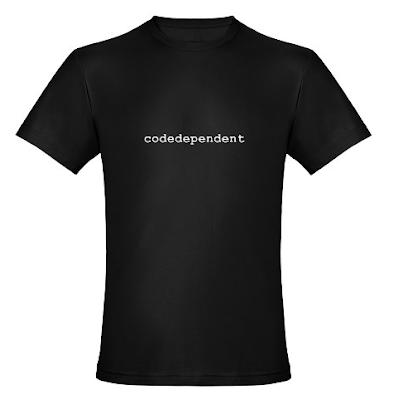
Here's the first such effort, especially topical for this blog, "codedependent" (available in various colors/styles - see the site for the full array):
Everyone's supposed to make a resolution on New Years, so here's mine: post more articles/blogs/videos about Android development. Starting with today's video tutorial.
Here's the first in what I hope will be a series of video tutorials on anything ranging from graphics to animation and back to graphics (hey, it's my show and I might as well talk about the things I enjoy).
For the Devoxx conference last November, I developed a simple picture-viewing application to demonstrate various facets of UI development that Romain Guy and I were talking about that week. You can see the presentations online at parleys.com (you'll have to register for 79 Euros to get access to them for now). But I wanted to deep dive into particular aspects of this application for my blog. Here's the first of these tutorials, in which I talk about the simple reflection effect used in the application. By the way, credit for the beautiful pictures goes to Romain, my source for all of my, er, borrowed images.
The video is in two parts (because YouTube thinks that I talk too much, so I had to split it). This first part introduces the show and talks about the effect at a high level:
Part 2 dives into the code that makes the reflection effect work:
The code in the video is a tad blurry (given the resolution of the video compared to the size of the IDE window), so here's the code from PictureView.java that I walk through for your reading pleasure (note that this code looks slightly different than that in the video due to formatting for a smaller line wrap. Also, the blurryBitmap image is now created to be only as high as the reflection height, as described in the comments):
private Bitmap getReflection(Bitmap bitmap) {
    Bitmap reflection = reflections.get(bitmap);
    if (reflection == null) {
        // We're cropping the height of the reflection to 80
        int reflectionH = 80;
        reflection = Bitmap.createBitmap(bitmap.getWidth(),
                reflectionH, Bitmap.Config.ARGB_8888);

        Bitmap blurryBitmap = Bitmap.createBitmap(bitmap, 0,
                bitmap.getHeight() - reflectionH,
                bitmap.getWidth(), reflectionH);
        // cheap and easy scaling algorithm; down-scale it, then
        // upscale it. The filtering during the scale operations
        // will blur the resulting image
        blurryBitmap = Bitmap.createScaledBitmap(
                Bitmap.createScaledBitmap(
                        blurryBitmap,blurryBitmap.getWidth() / 2,
                        blurryBitmap.getHeight() / 2, true),
                blurryBitmap.getWidth(), blurryBitmap.getHeight(), true);
        // This shader will hold a cropped, inverted,
        // blurry version of the original image
        BitmapShader bitmapShader = new BitmapShader(blurryBitmap,
                TileMode.CLAMP, TileMode.CLAMP);
        Matrix invertMatrix = new Matrix();
        invertMatrix.setScale(1f, -1f);
        invertMatrix.preTranslate(0, -reflectionH);
        bitmapShader.setLocalMatrix(invertMatrix);

        // This shader holds an alpha gradient
        Shader alphaGradient = new LinearGradient(0, 0, 0, reflectionH,
                0x80ffffff, 0x00000000, TileMode.CLAMP);

        // This shader combines the previous two, resulting in a
        // blurred, fading reflection
        ComposeShader compositor = new ComposeShader(bitmapShader,
                alphaGradient, PorterDuff.Mode.DST_IN);

        Paint reflectionPaint = new Paint();
        reflectionPaint.setShader(compositor);

        // Draw the reflection into the bitmap that we will return
        Canvas canvas = new Canvas(reflection);
        canvas.drawRect(0, 0, reflection.getWidth(),
                reflection.getHeight(), reflectionPaint);
    }
    return reflection;
}
And finally, here's the Eclipse project complete with source code, images, and everything you need to build and run the application. The app is targeted at Android 2.2 (Froyo) (and probably could work on earlier versions as well), so you should be able to run it on the emulator or any appropriate device. Note that it's just a demo and not really a full-featured photo viewer; it was written to demonstrate particular effects and techniques, not to be a real application.
Now that my New Year's resolution is fulfilled, I should go back to working on Android framework code...
Here are slides for two of the approximately 871 talks that Romain Guy and I gave at Devoxx last month (and again at the SF Android User Group meeting a couple of days ago).
Videos of all of the Devoxx sessions are already posted on the excellent Parleys site for a small subscription fee, and should be made freely available sometime in the next few months. You probably want to check out those videos for the complete details. But in case you were at the talks, are sick of listening to us speak, or simply want to peruse the slideware, here you go...
By popular demand, Flex 4 Fun is now available for the Kindle!
If you order the eBook on the Artima site, you can download the Mobi as well as the PDF version. In fact, if you already bought the eBook, you can log into your Artima account and download the new Mobi version. Once you have the .mobi file, you can copy/email it to your Kindle device and start reading.
I'm back from the annual Devoxx conference, a fun and thoroughly exhausting week in Antwerp spent presenting, attending, and generally hanging out. It's always a great time, despite the weather and the overall grayscale cityscape.
This picture from the show was taken during one of my sessions when I was either talking about a GUI frame or saying hello to my Hawaiian friends.
I presented in several sessions, including 4 sessions with Romain Guy about Android and UI programming and one on topics from my book, Flex 4 Fun. I spent most of the week either on stage or writing slides and demos to present on stage. There's nothing like procrastination to keep you busy at the last minute.
For anyone that missed the presentations, see below about their availability on parleys.com. We may also post the slides someday, although it's always better to get the full deal (slides+audio+video). Also, I intend to post a couple of the demos I showed in the Android talks (the Flex demos are already available on the book site).
The sessions this year were, as always, recorded and will be released on parleys.com, an excellent site for viewing presentations with lots of content from previous years as well as other developer forums. The talks are released incrementally during the year for free, or you can buy a subscription to view them all for 79 Euros. In fact, parleys just announced that the 2009 recordings are now all available and all free. The talks and the recordings are of very high quality, so you should check out the site..
Anyway, thanks to Stephan Janssen for another great conference. Shaka!
Flex 4 Fun is finally, once again, in stock at Amazon.com. It's been "Temporarily out of stock" for the past coupjle of weeks for reasons that escape me, but which are probably one of these two possibilities:
Amazon is really new at this business of selling books and is still learning how to keep appropriate amounts of inventory on-hand.
They lost all the copies they had and had to rewrite the book from scratch, based purely on the cover picture on their website. I hope their version is as gripping as the original.
In any case, you can now order it in peace.
At the same time, they bumped the price a bit, to $26.60. This is fantastic news, of course, for two reasons:
The book now costs just about a cup of coffee more than it used to on Amazon. This means that you may have to forego that cup when you read it, thus preventing unfortunate spills and mess.
Even better, the new price means that the book is just over Amazon's Free Shipping limit here in the U.S. That's probably the thing that a lot of you were waiting for in order to finally purchase it.
I'll be joining Jacob Surber from Adobe this week to speak to the local Flex user group, SilvaFUG (which I think stands for "Silicon Valley Flex User Group." Or maybe it's "Silver and Fugly"). We'll be in San Francisco on Tuesday evening (the 12th) and San Jose on Thursday evening (the 14th).
The topic is "Fun with Flex Skinning." I'll start off with an overview of the visual aspects of Flex 4 (which, by bizarre coincidence, are exactly the topics covered by Flex 4 Fun. Funny how that worked out). Then I'll walk through an extended example of skinning a simple component to show how these visual elements are used to enable easy development of very custom-looking components. I promise there will be much more code than bullet-points. Jacob will then go into more detail about skinning, including possible workflows and tools for design and development of custom components.
More information about the events can be found on the SilvaFUG site.
I hope to see you there; it should be a Flex 4 Fun evening. Both times.


 . It's been "Temporarily out of stock" for the past coupjle of weeks for reasons that escape me, but which are probably one of these two possibilities: